01
Spaces
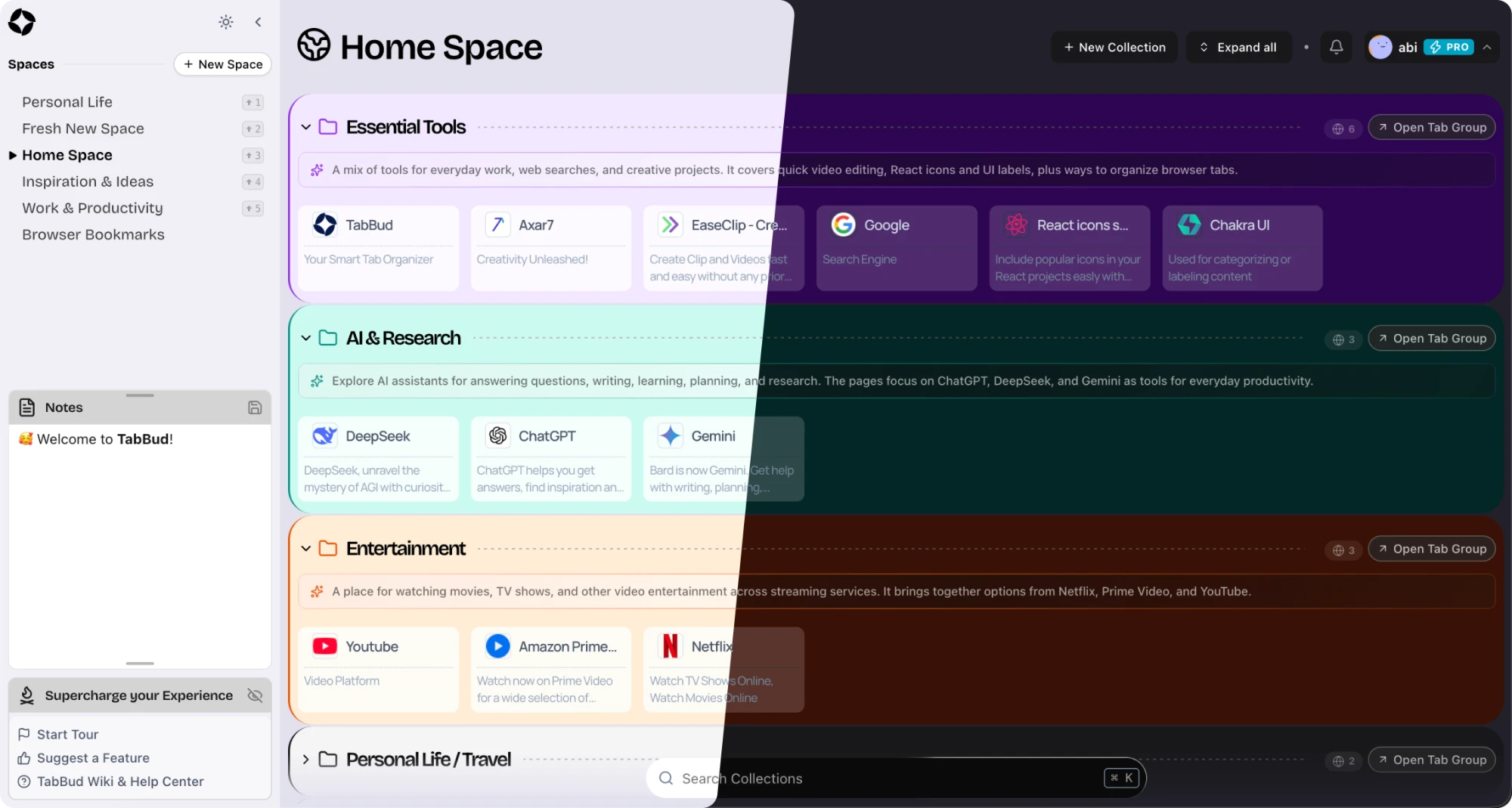
A Space is a top-level area for one part of your life: work, a client, a course, a side project. Switch Spaces and only that context is on screen.

Save any tab as a Card, group Cards into Collections, and give each project its own Space. Your library syncs across Chrome, Firefox, Edge and Brave, with notes and global search built in.










Three levels, so every saved tab has an obvious home — and you always know where to look.
01
A Space is a top-level area for one part of your life: work, a client, a course, a side project. Switch Spaces and only that context is on screen.
02
Collections group related tabs inside a Space. Give each one its own color, reorder them by drag and drop, and move a Collection to another Space at any time.
03
A Card is a saved tab. One click captures its title, description, URL and favicon, so it is easy to recognise and find again.
Open a new tab and your Spaces, Collections and notes are already there. Save the page you're on from the popup without leaving it.
⌘K search
Notes beside your tabs
Your layout
Light, Dark or Auto
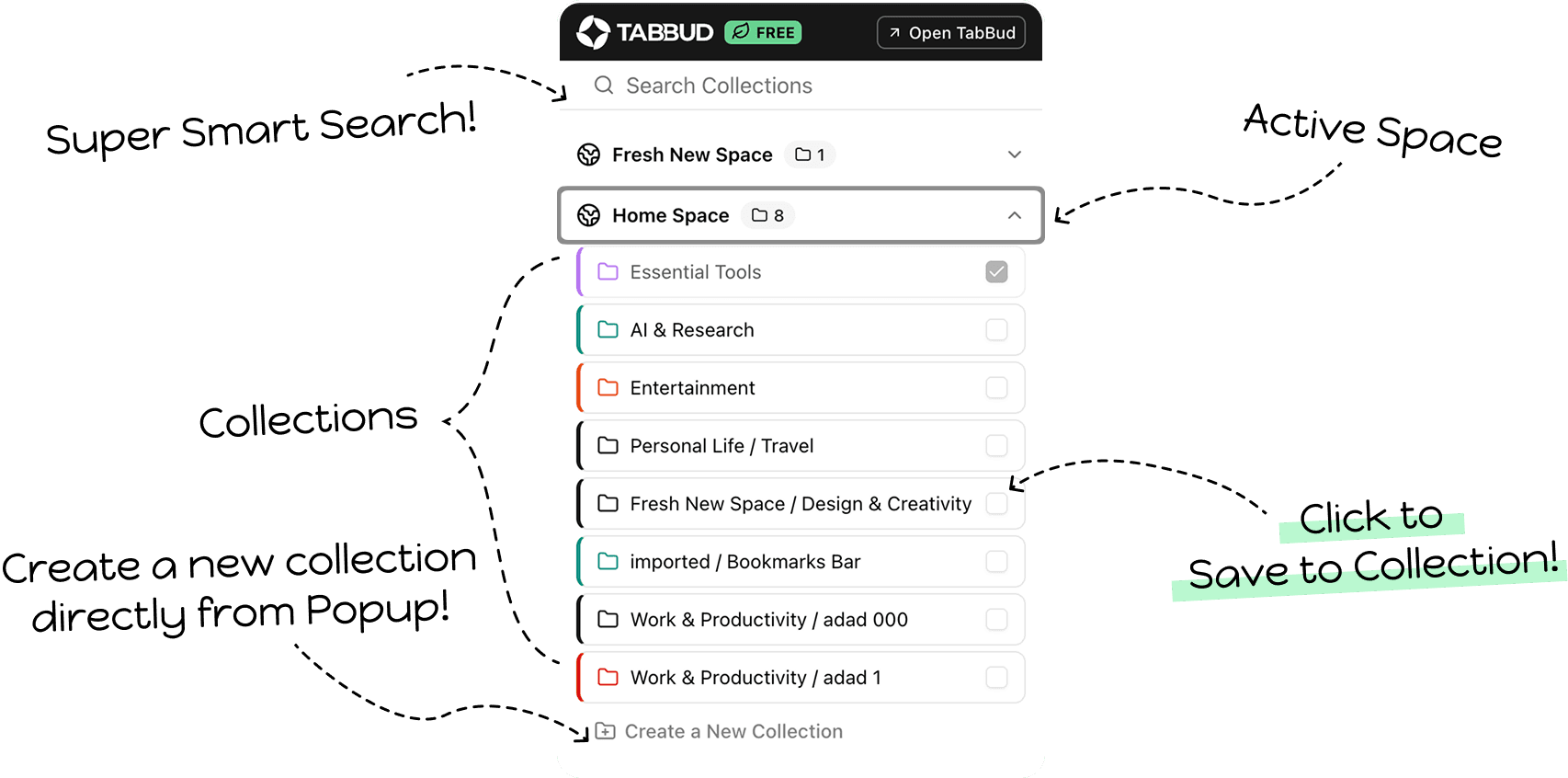
Click the TabBud icon on any page, then click a Collection. The tab is saved and you never leave the page you're on.
Add TabBud from the Chrome Web Store or Firefox Add-ons. It also runs on Edge, Brave and other Chromium browsers.
Continue with Google or use email. Your library syncs from the first save.
Import browser bookmarks or a OneTab, Toby, Session Buddy or Workona export. Preview first; duplicates are skipped.
Click the TabBud icon, pick a Space, then click a Collection. Or right-click any page and choose Save with TabBud.
Save, search, sync and share your tabs, without another monthly bill.
Press ⌘K and search titles, URLs, descriptions and notes across every Space.
Chrome at work, Firefox at home: one account keeps the same library on both, synced automatically.
Share a Space with view or edit access, so everyone works from the same links.
Sit down to work and open a whole Collection at once, as one browser tab group.
Bring in bookmarks, OneTab, Toby, Session Buddy, Workona, Raindrop.io, Pocket, CSV or Markdown. Export to HTML, JSON, CSV or Markdown whenever you like.
Save the current tab from the popup, or right-click any page and choose Save with TabBud.
Your Spaces, Collections and notes open on every new tab.
Reorder Spaces, Collections and Cards, and move a Collection to another Space.
Give each Collection a color and move it between Spaces in two clicks.
Grid, List, Grid List or Narrow grid, plus a Compact Mode for small screens.
The extension follows your OS or the theme you pick.
Your saved tabs and notes stay available without a connection.
See how your library is used, from your profile.
Every Collection gets a short AI summary, on every plan.
No subscription, no renewal, no monthly bill. Start free, and upgrade only when you need more.
$0
Everything you need to get your tabs in order, free for as long as you like.
$49
No limits, plus shared Spaces for working with other people. Pay once and keep it.
Coming soon
A plan for teams is on the way. Need to work together today? Pro includes shared Spaces.
Details will be shared when the plan launches.
Saved vs Workona Pro over 5 years$371TabBud Pro pays for itself in month 7
Every tab, in its place.
Start free in seconds — no credit card required. Upgrade to Pro once, whenever you need more.
TabBud is a tab and bookmark manager browser extension made by Axar7. It saves tabs as Cards, grouped into Collections inside Spaces, with cloud sync, rich-text notes and global search. It works on Chrome, Firefox, Edge, Brave and other Chromium-based browsers, and imports from browser bookmarks, OneTab, Toby, Session Buddy and Workona. The Free plan includes 200 Cards, 20 Collections and 5 Spaces. Pro is a $49 one-time payment.
Free includes 200 Cards, 20 Collections and 5 Spaces, with cloud sync, notes, global search, import and export, AI summaries and dark mode, and needs no credit card. Pro is a $49 one-time payment that removes every limit and adds shared Spaces with view or edit access, usage reports and support on X.
Chrome, Firefox, Microsoft Edge, Brave and other Chromium-based browsers. Install it from the Chrome Web Store (for Chrome, Edge, Brave and other Chromium browsers) or from Firefox Add-ons. Safari isn't supported.
Yes. TabBud is cloud-first: your Spaces, Collections, Cards and notes sync automatically every few minutes, and you can sync by hand from your profile. Sign in on any supported browser to see the same library.
Yes. TabBud 2.3 imports bookmark files from any browser, exports from OneTab, Toby, Session Buddy, Workona, Tab Manager Plus, Raindrop.io and Pocket, and CSV or Markdown files. You can also import straight from your browser's bookmarks. A preview shows what will be created before anything is saved, duplicates are skipped by default, and you can undo an import.
There's nothing to cancel, because Pro is a one-time payment, not a subscription. Refund requests are reviewed case by case: email business@axar7.com. You can use the Free plan first to make sure TabBud fits before you upgrade.
See how TabBud stacks up on price, sync, sharing and browsers — with sources for every claim.
| Tab manager | Price | Comparison |
|---|---|---|
| TabBud | $49 once (Pro)One-time | Free plan |
| TabBud vs Workona | From $7/mo (Pro)Subscription, per user | |
| TabBud vs Toby | $54/yr yearly or $6/mo (Productivity)Subscription, per member | |
| TabBud vs OneTab | None publishedFree | |
| TabBud vs Session Buddy | None todayFree (cloud premium planned) |
Give each part of your work its own Space. Here is what a few people keep in theirs.
Organize papers, sources and citations by project.
Save docs, GitHub issues and reference pages by feature.
Collect inspiration, client briefs and design references in Collections.
Track roadmap items, competitor research and user feedback.
Keep course materials, readings and study resources by subject.
Share a Space with view or edit access so everyone works from the same links.